
v2.0.0
Dynomate 2.0.0
Dynomate 2.0 adds 23 DynamoDB and Athena operations and the Dynomate CLI (preview), which runs requests outside the desktop app. DNML, the new request specification, makes sure that the desktop app and the CLI run the same files. This release also adds AWS Login profiles, a native build for Intel Macs, and many design and usability improvements to the desktop app. Read the breaking changes before you update.
RELEASED
Release notes
-
Feature
23 DynamoDB and Athena Operations
Use one request for work that needed a script before. Version 1.19 had four request operations. Version 2.0 has 23:
- Items: Get, Query, Scan, Put, Update, Delete, Batch get, Batch write, Read transaction, Write transaction and PartiQL statement.
- Tables: Describe, List, Create, Delete, Truncate and Update time to live.
- Data movement: Import items from inline data, a local file, Amazon S3 or a different table. Export items to a local JSON, JSON Lines or CSV file.
- Athena: Query, List databases, List tables and Describe table.
For example, one request can truncate a development table and then copy the production items into it. The production table can be in a different AWS account.
Read the Operation reference.
-
Feature
DNML Request Files
DNML is the file format that the desktop app and the CLI share. A request that you build in the app runs in the CLI with no changes.
DNML uses TOML. You can read a request, review changes in pull requests and keep requests in Git. A collection is a folder, and each request is one
.dnmlfile in that folder. If one file has an error, Dynomate identifies it and continues to show the other requests.This file contains the request from the example above:
version = "1.0"
name = "refresh-dev-orders"

[defaults]
profileName = "commerce-dev"

[[dynamodb.truncate]]
name = "Clear dev orders"
tableArn = "arn:aws:dynamodb:us-east-1:123456789012:table/Orders-dev"
guard = { expectTableName = "Orders-dev" }

[[dynamodb.import]]
name = "Copy production orders"
dependsOn = "Clear dev orders"
tableArn = "arn:aws:dynamodb:us-east-1:123456789012:table/Orders-dev"
source = { type = "dynamodb-table", tableArn = "arn:aws:dynamodb:us-east-1:111122223333:table/Orders", profileName = "commerce-prod" }
The import starts only after the truncate is successful. If the table name is not
Orders-dev, the guard stops the truncate.Read the DNML Specification.
-
Feature
Dynomate CLI (Preview)
Run your requests from a terminal or a CI pipeline with
dynomate-cli. The CLI runs the same DNML files as the desktop app. It also uses the same saved environments and AWS profiles. This is the first public preview.This command runs the request from the example above:
dynomate-cli requests run ./refresh-dev-orders.dnmlIn CI, use
--approval never. If a run must have approval and no terminal is available, the run stops before it starts.Install the CLI from npm as
@dynomate/cli@next. It works on macOS 11 and later, Windows x64 and Linux x64.Read Install the Dynomate CLI and Automation and CI.
-
Feature
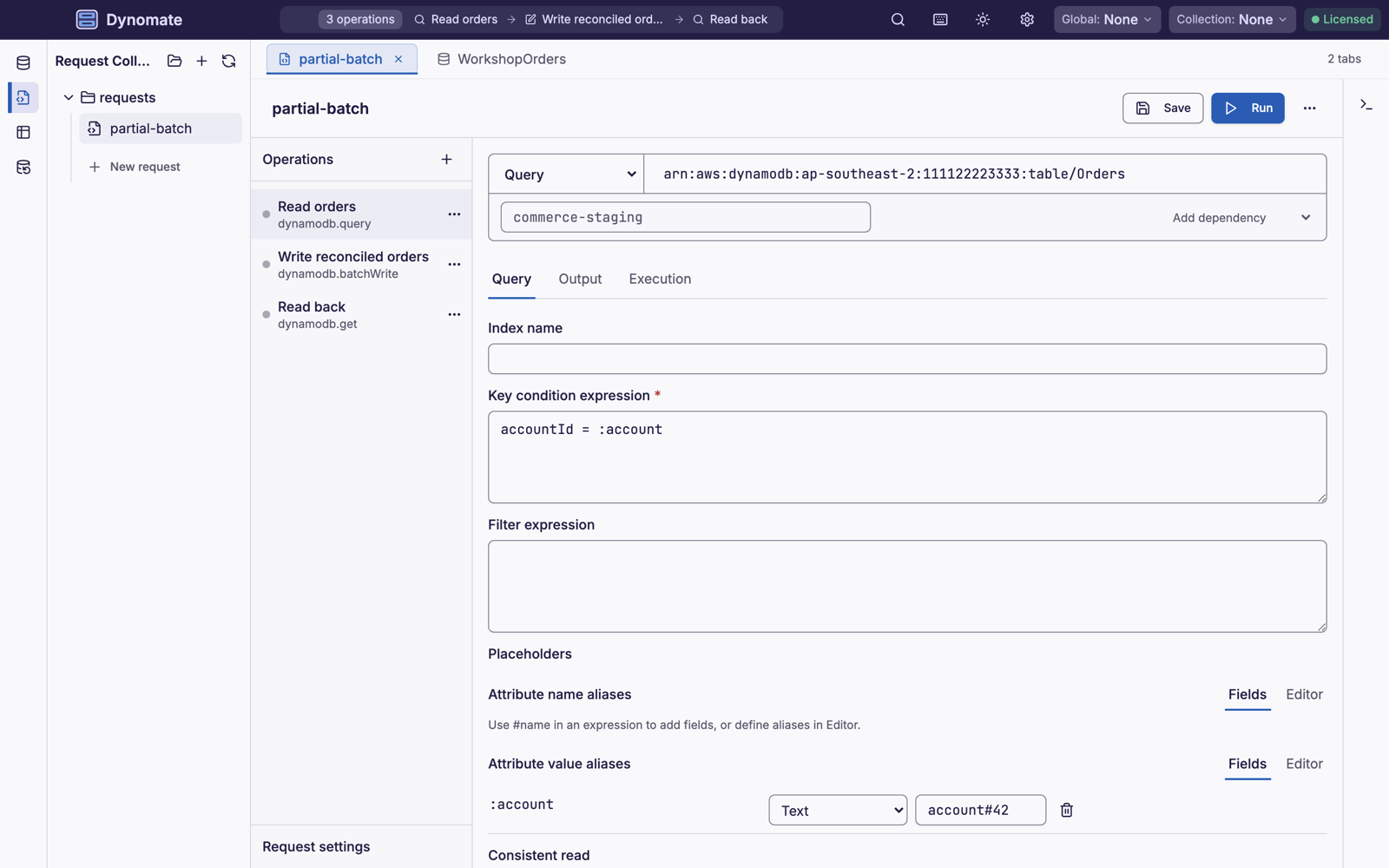
Redesigned Request Collections
The request collections interface is new. Build each operation in a form, run the request, and see the result of each operation in one view.
Read Build a request.
-
Feature
AWS Login Profiles
Dynomate can now use profiles that you create with
aws login. When the session expires, click Sign in with browser. If your browser is on a different device, click Use a code instead.Dynomate keeps the session in the same cache as the AWS CLI. After you sign in one time, the session works in the two tools.
Read AWS Login.
-
Feature
Easier SSO and MFA Sign-In
If the browser does not open during SSO sign-in, copy the sign-in link from Dynomate into your browser. Before, the sign-in stopped when the browser did not open.
Dynomate also shows the SSO verification code and a countdown. Approve the request only if your browser shows the same code. For MFA, enter the 6-digit code in a separate step. When a session has 10 minutes or less before it expires, the status changes to amber. Renew the session before your work stops.
Read SSO Authentication.
-
Feature
Native Build for Intel Macs
Dynomate now runs natively on Intel Macs. Automatic updates install the correct build for your Mac.
Download the Intel build from Installation.
-
Feature
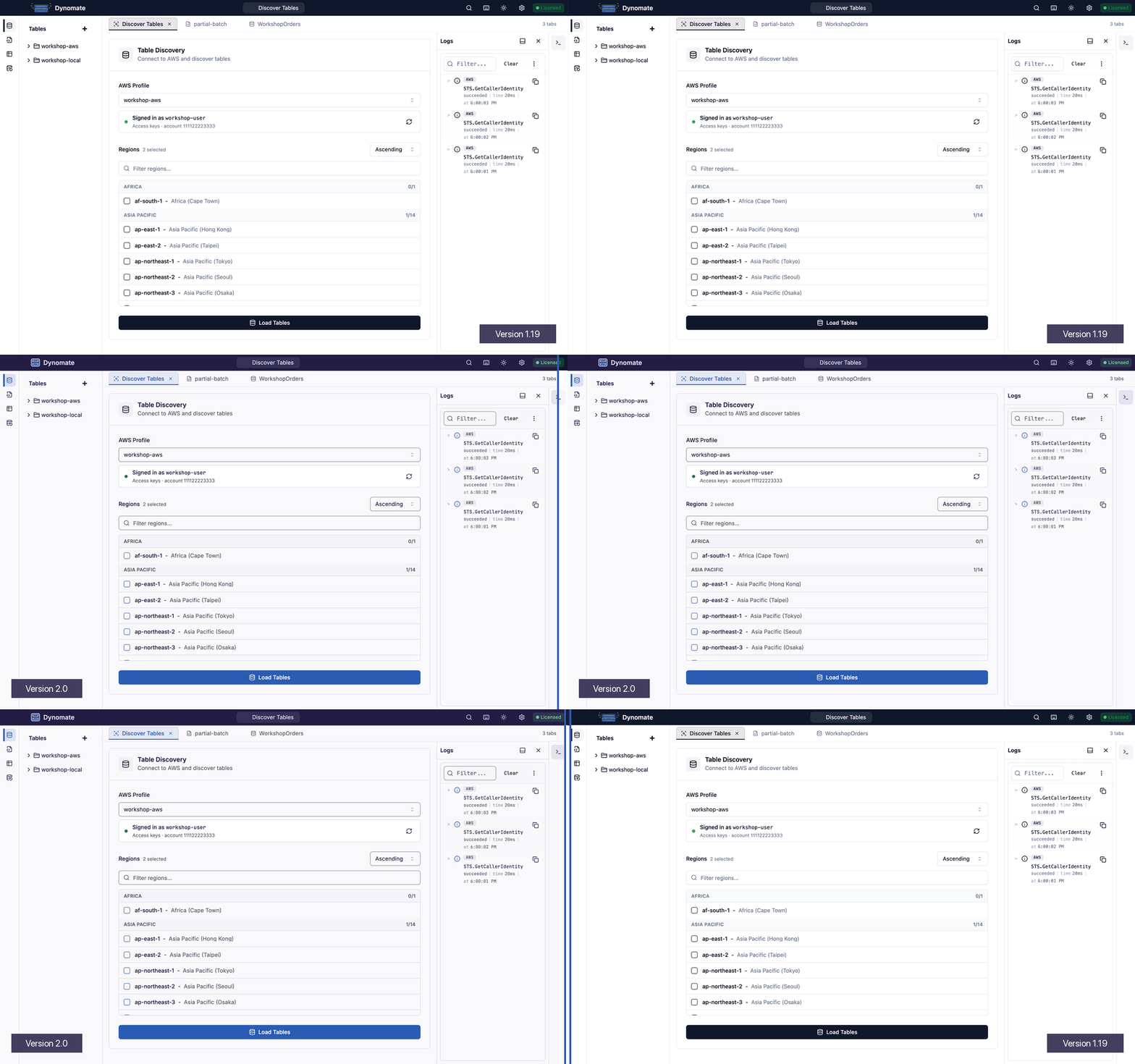
A New Look
Dynomate has new light and dark themes that match the Dynomate website. The app also has a new logo, new app icons, new fonts and a redesigned command palette.
-
Feature
JSON Inspector and Logs Where You Need Them
The dock now shows the JSON Inspector and Logs only in the tabs that use them. Table tabs open with the two panels. SQL and Athena tabs open with the JSON Inspector. Request tabs show Logs but not the JSON Inspector.
When you open or close a panel, Dynomate keeps your choice across these tabs until you restart the app.
Read JSON Inspector and Logs.
-
Fixed
Faster Editor for Large Requests
In a request with many operations, the editor no longer redraws the hidden parts of the form. The editor now responds faster when you type.
-
Fixed
Correct Values in the SQL Tab
The SQL tab now shows very large unsigned integers and geometry values correctly. Unknown column types show as text and do not cause an error.
-
Fixed
JSON Copy Only From the Focused Viewer
⌘C / Ctrl+C now copies a full JSON document only when a JSON viewer has focus. Before, it could copy a document from a different part of the app.
-
Breaking
TOML Collections Are Deprecated
Dynomate 2.0 uses DNML files for requests. When you open a request in a 1.19 TOML collection, Dynomate asks you to upgrade the collection. Click Migrate collection. Your original
.tomlfiles do not change.To upgrade from the CLI:
dynomate-cli requests migrate --collection ./ordersSave all open request edits in 1.19 before you update. Dynomate 2.0 does not keep unsaved edits.
-
Breaking
HTTP Endpoints in Requests Must Be Local
Requests accept
http://endpoints only forlocalhost, IPv4 loopback addresses such as127.0.0.1, and::1. All other endpoints must use HTTPS. This rule also applies when a request uses an endpoint from an AWS profile.If you connect to DynamoDB Local through a Docker host name, such as
http://dynamodb-local:8000, publish the container port. Then usehttp://localhost:8000.Read Safety: Endpoints.