
Discover DynamoDB Tables
Table discovery reads the table list from the AWS profile and Regions that you select. Dynomate stores the results locally and groups them by profile and Region.
Before you start
- Add or select an AWS profile in Dynomate.
- Complete SSO or MFA authentication when the profile requires it.
- Confirm that the profile can access each Region that you want to scan.
A local DynamoDB endpoint uses its configured profile and one Region. It does not call AWS STS.
Discover tables
- Open Settings.
- Select Table discovery.
- Select an AWS profile.
- Select one or more Regions.
- Select Load Tables.
Use the Region search to find a Region by code or name. Dynomate can check several selected Regions in one run.
Review the results
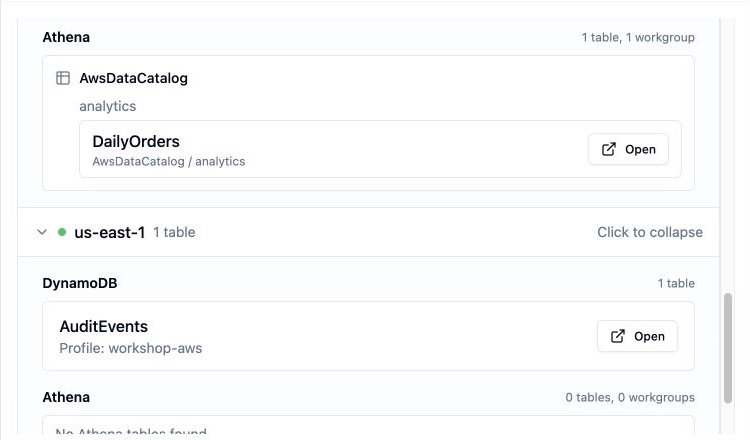
Dynomate shows table counts and errors for each Region. A failure in one Region does not hide successful results from other Regions.
Discovered tables appear in the sidebar under the selected profile and Region. Tables are sorted by name. Select Open in the results, or select a table in the sidebar.
Discovery is not live search
Global search uses the tables that Dynomate has already discovered. Run discovery again after you create or delete tables in AWS.
Required permissions
Identity check
sts:GetCallerIdentityto identify the AWS account.
DynamoDB discovery and use
dynamodb:ListTablesin each selected Region.dynamodb:DescribeTablewhen you open a discovered table.
A table read also needs dynamodb:Query or
dynamodb:Scan. See DynamoDB query permissions.
Athena discovery and use
athena:ListDataCatalogsathena:ListDatabasesathena:ListTableMetadataathena:ListWorkGroupsathena:GetWorkGroupathena:StartQueryExecutionathena:GetQueryExecutionathena:GetQueryResultsathena:StopQueryExecutionwhen you cancel a query.
The selected catalog, data source, workgroup, and result location can also require AWS Glue, Lake Formation, S3, or KMS access. Dynomate does not call those services directly during metadata discovery and does not preflight their policies. See Athena Overview and Discovery.
Common problems
- Authentication expired: Sign in again, then rerun discovery.
- Access denied: Check STS and DynamoDB permissions for the selected profile.
- One Region failed: Open that Region result and check its error. Other Region results remain available.
- A new table is missing: Rerun discovery for its profile and Region.