
Edit and delete table items
Inline edits and JSON Inspector edits enter the staged-change queue. The Edit Item dialog writes immediately and does not enter that queue.
Choose an editing path
Inline table editing stages the change
- Edit a cell in the table view.
- Complete the cell edit.
- Open Review Changes before you commit.
JSON Inspector editing stages the change
- Select a table row.
- Edit its JSON in JSON Inspector.
- Keep the document as valid JSON.
- Open Review Changes before you commit.
Updated rows use a change indicator in the grid. A staged key change uses a delete and put when you commit it.
Edit Item writes immediately
- Open the row context menu.
- Select Edit to open the Edit Item dialog.
- Review the original and modified JSON.
- Select Save changes.
Use inline editing or JSON Inspector when you want a separate review step. Use Edit Item only when an immediate write is appropriate.
Stage a delete
- Select one or more loaded rows.
- Open the row context menu.
- Select the delete action.
The rows remain available for review until you commit or discard the staged delete.
Review changes
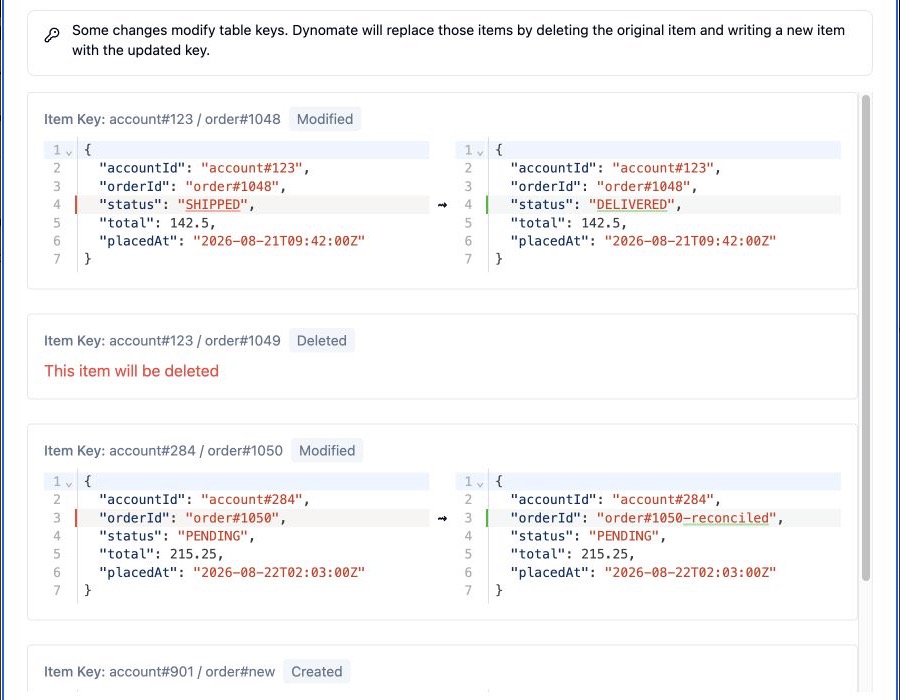
- Select Review Changes.
- Check each created, modified, or deleted item.
- Review the JSON differences.
- Correct an update in the review dialog when required.
Commit changes
- Open Review Changes.
- Confirm that the profile, Region, and table are correct.
- Select the commit action.
- Wait for the transaction to finish.
Dynomate sends the staged operations in one DynamoDB transaction for the active table. DynamoDB applies all operations in that transaction or applies none of them.
Dynomate clears staged changes and refreshes the table after a successful commit. It keeps the staged changes when the transaction fails so that you can correct or retry them.
Discard changes
Select Discard Changes in the action bar, or select Clear All in the review dialog. Dynomate removes the staged operations from the table tab and refreshes the data.
Discarding staged changes does not call a DynamoDB write operation.
Transaction limits
- A commit can contain at most 100 DynamoDB transaction actions.
- An update that changes a key uses two actions: delete the original item and put the new item.
- DynamoDB item size, key, condition, and transaction restrictions still apply.
AWS permissions
- Staged commits require
dynamodb:TransactWriteItemsfor the active table. - The Edit Item dialog requires
dynamodb:UpdateItem. - The profile needs read permission to refresh the table after a write.