
Export DynamoDB table data
Dynomate supports fast downloads of loaded results and background exports of a full table. Choose the scope before you start.
Choose an export scope
| Scope | Data read | Output |
|---|---|---|
| Current page | Rows already loaded by the current scan or query | JSON or CSV |
| Selected rows | Selected loaded grid rows | JSON or CSV |
| Full table | Every item found by a new parallel table scan | Gzipped JSON Lines or CSV |
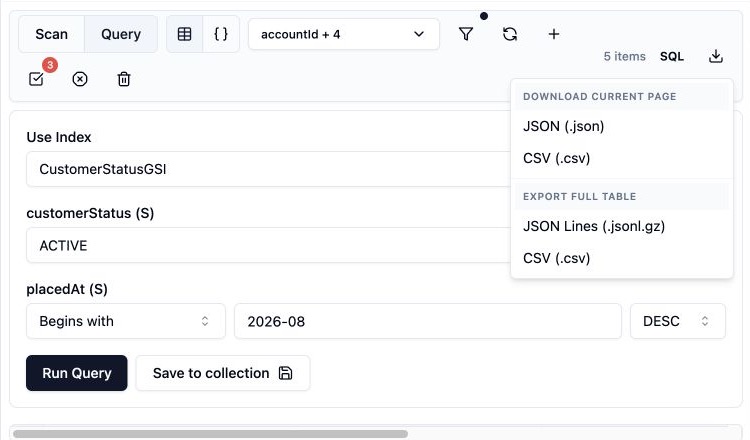
Download the current page
- Run a scan or query.
- Scroll to load all rows that you want in the file.
- Select the attributes that you want to include.
- Open Download & export.
- Select JSON or CSV under Download current page.
This download does not request another page and does not scan the full table. It saves the rows that are loaded in the current view. The selected attribute list controls the fields in the file. An empty attribute selection includes all available fields.
Download selected rows
- Select multiple rows in the grid.
- Open the row context menu.
- Select JSON or CSV export.
This action saves only the selected loaded rows.
Export the full table
- Open Download & export.
- Select a full table format.
- Confirm the output location.
- Use automatic scan settings, or open advanced settings.
- Start the export.
- Gzipped JSON Lines: Writes one JSON item per line in a
.jsonl.gzfile. - CSV: Writes a
.csvfile.
Advanced settings control scan segments and scan page size. More segments can increase scan rate and throttling. Page size controls the number of items requested in each scan page. It is not a read-capacity limit.
Dynomate also builds a local snapshot artifact for a completed full export. Use Query snapshot after the snapshot is ready to run local SQL against that artifact.
To export from a request or CI, use dynamodb.export.
Monitor or cancel
The status panel shows Queued, Running, Cancelling, Cancelled, Completed, or Failed. It also shows exported item count, estimated progress, output size, and an estimated time when available.
DynamoDB table item counts and sizes are estimates. Progress percentages and time estimates can change during the export.
Cancel stops future scan work. It does not undo read capacity that the export has already consumed.
If the job fails, see import and export failures.
Read capacity and cost
- Run large exports during a low-traffic period.
- Reduce scan segment fanout when the table is provisioned near its read limit.
- Monitor DynamoDB throttling and consumed read capacity.
- Use a current-page download when you only need loaded query or scan results.
AWS permissions
dynamodb:DescribeTableto estimate table size and item count.dynamodb:Scanto read the full table.
Current-page and selected-row downloads use data that is already loaded.