
Query and filter table items
Use a query when you know a partition key. Use a scan when you need to inspect items without a partition key value.
Choose Scan or Query
- Query: Reads items with one exact partition key value. It can also use a sort key condition.
- Scan: Reads items across the table or a selected index.
Both modes can use DynamoDB filter expressions. A filter is applied after DynamoDB reads the candidate items.
For background, see when to use Query or Scan.
Run a query
- Select Query.
- Select a global or local secondary index, if applicable.
- Enter the exact partition key value for the selected key schema.
- Add a sort key condition when the selected key schema has a sort key.
- Select ascending or descending sort direction when it is available.
- Select Run Query.
Dynomate enables the query after you enter a valid partition key. Change a value and select Run Query, or refresh the table, to run it again.
To reuse a query, select Save to collection.
Sort key operators are:
- Equals
- Begins with
- Between
- Greater than
- Less than
- Greater than or equal
- Less than or equal
Sort direction controls DynamoDB sort-key order. It is different from a local grid column sort.
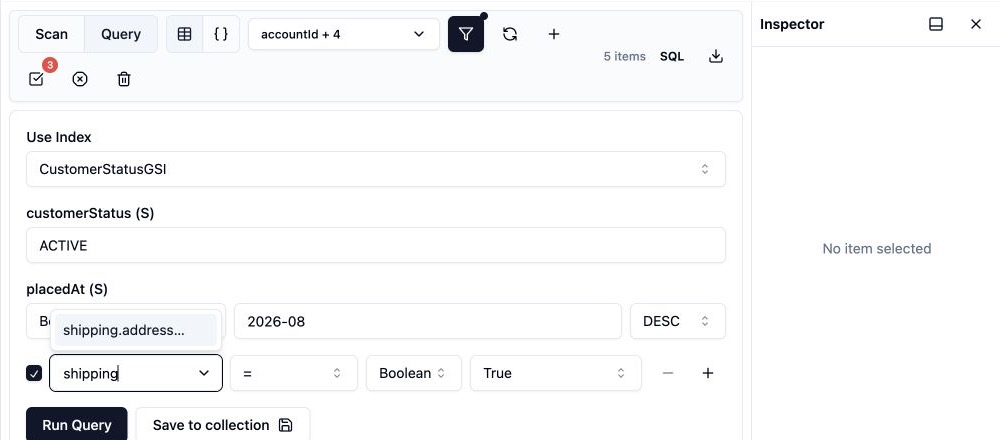
Run a scan
- Select Scan.
- Select an index, if applicable.
- Open filters when you need a filter expression.
Dynomate updates the scan after a short delay when you change its index or filter. There is no separate Run Scan button.
Build a filter
- Select Show Filters.
- Enter or select an attribute path.
- Select a value type.
- Select an operator.
- Enter the required value or values.
- Add more conditions when required.
Dynomate joins enabled conditions with AND. You can disable a condition without deleting it.
Available filter operators are:
- Equals, not equal, less than, greater than, less than or equal, and greater than or equal.
- Between and In.
- Contains and Begins with for string values.
- Exists and Not exists.
- Size.
Boolean conditions support Equals, Not equal, Exists, and Not exists. Enter comma-separated values for In.
Filter nested attributes
Use dot notation for map values, such as profile.address.country. Use a numeric index for a list value, such as items[0].sku.
Dynomate learns attribute path suggestions from returned items and stores them locally for that table. A suggestion such as items[].sku describes values inside a list. Replace the wildcard with a numeric index before the filter runs.
You can enter a valid path that has not appeared in suggestions. In Query mode, the active partition and sort key attributes are not offered as post-query filter suggestions. Set those values in the key controls.
Read capacity and cost
For an on-demand table, AWS bills read request units for the items read before the filter. For a provisioned table, the same reads consume the table or index read capacity units. Prefer Query when the access pattern has a partition key. A Scan can read a large part of a table or index and compete with application traffic.
For background, see how DynamoDB pricing works.
AWS permissions
dynamodb:DescribeTableto load the key and index schema.dynamodb:Queryto run queries.dynamodb:Scanto run scans.
Include the required table and index ARNs in the IAM resource scope.
If a query or scan fails, see failed scans and queries.